I found Cloudflare Content Signals affecting my own site by accident.
Two days ago I was staring at Bing Webmaster Tools telling me a page on natepegram.com had been "Discovered but not crawled" for 40 days. I ran through the usual suspects. Server errors, a rogue noindex meta tag, a canonical pointing somewhere weird, a redirect chain, a rate-limited response. All fine. BingBot got a clean 200 every time it tried.
Then I opened natepegram.com/robots.txt and found a block of text I had never written. My own robots.txt was still there. Above it, Cloudflare had prepended something else:
# BEGIN Cloudflare Managed content

User-agent: *
Content-Signal: search=yes, ai-train=no, use=reference
Allow: /

User-agent: GPTBot
Disallow: /

User-agent: ClaudeBot
Disallow: /

User-agent: CCBot
Disallow: /

User-agent: Google-Extended
Disallow: /
...and on for four more crawlers.
Every AI training crawler I had spent the previous week explicitly allowing in Cloudflare's AI Crawl Control dashboard (Cloudflare's rebrand of AI Audit as of early 2026) was being disallowed at the robots.txt layer by Cloudflare itself. Well-behaved crawlers read robots.txt first. They saw the Disallow. They skipped my site. The dashboard kept telling me GPTBot, ClaudeBot, and CCBot were allowed. The /robots.txt endpoint kept telling GPTBot, ClaudeBot, and CCBot to go away.
This is a confirmed bug, not just my site
Before writing this up I checked whether anyone else had observed the same mismatch. They had. Cloudflare's own community forum hosts a bug report titled "BUG AI Audit robots.txt rules - incorrectly saying bot allowed," which documents exactly the failure mode I hit: the dashboard displays GPTBot (and Applebot-Extended) as allowed while the served robots.txt actively disallows them.
Other operators have reproduced and reported the same dashboard-vs-served-file inconsistency.
The architectural reason is visible inside Cloudflare's AI Crawl Control section. Two independent settings affect how AI crawlers see your site, and they're controlled separately:
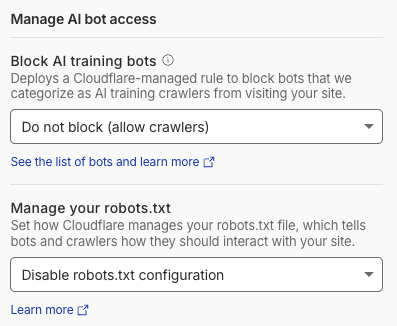
The first control (Block AI training bots) is an edge-layer dropdown that decides whether Cloudflare's network blocks AI training crawlers before they reach your origin. The second (Manage your robots.txt) is a file-injection dropdown that decides what Cloudflare prepends to your served robots.txt file. Cloudflare doesn't warn anywhere that the two can end up telling a crawler different things.
You can set the WAF dropdown to "Do not block (allow crawlers)" and simultaneously leave the robots.txt dropdown on "Set your preference to block training in robots.txt." Cloudflare lets GPTBot in at the edge. GPTBot fetches /robots.txt. Cloudflare's prepended block tells GPTBot to leave. GPTBot leaves.
The AI Crawl Control "Allowed" counter can hide the mismatch
This is the part that keeps the failure silent. Cloudflare's per-crawler dashboard reports what it calls "the total number of allowed and unsuccessful requests" for each AI crawler. What Cloudflare's documentation does not spell out is exactly what "Allowed" measures. It's an edge-level permission signal, not a confirmation that the crawler pulled any of your content.
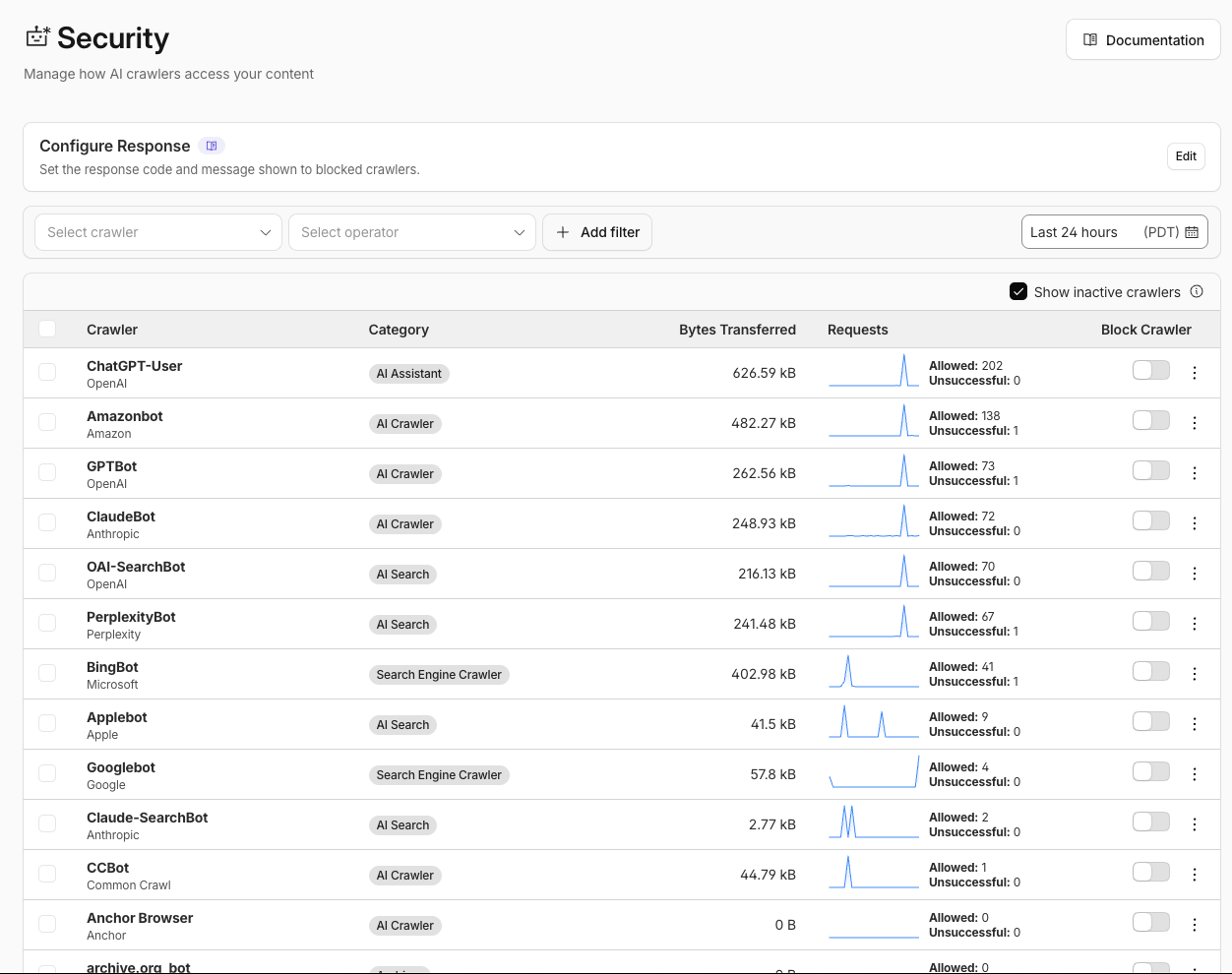
That distinction matters. A dashboard that shows GPTBot with "Allowed: 73 requests" does not confirm GPTBot fetched any of your pages. It confirms Cloudflare's edge let those requests through. If robots.txt is telling well-behaved crawlers to Disallow, the crawlers are complying and skipping your content, and the dashboard has no separate counter that would surface that state.
So the failure looks like success. Green toggles, a healthy Allowed count, a dashboard that appears to reward your optimization work. And the crawlers are quietly reading your robots.txt and going elsewhere.
Why the default hurts anyone who wants to be found by AI
Cloudflare's Content Signals feature was built with publishers in mind. News outlets, magazines, journalism sites, media companies. Customers who have been vocal about wanting compensation from AI companies for training on their content. For those customers, the default aligns with their business model. Pay before training. That is the philosophical thrust of what Cloudflare announced on Content Independence Day (July 1, 2025), when they framed the shift as "changing the default to block AI crawlers unless they pay creators for their content."
There are two things AI systems do that matter here, and they aren't the same.
Real-time retrieval is the first. When someone asks ChatGPT or Perplexity a question, the assistant fetches live pages and cites them in the answer. Current information, current pricing, current availability, delivered inside the assistant's response. For agentic commerce and for any site that wants to be cited by AI, this is the closest analog to Google Search. Being blocked from it is a direct cost.
Training corpus inclusion is the second, and it's a legitimately harder call. Some site owners want their content in the training corpus so a model has baseline familiarity with them. Others would rather be compensated, keep proprietary data out, or wait for the AI licensing market to settle before deciding. This piece does not resolve that debate.
The problem with Cloudflare's managed robots.txt default is that it treats those two AI use cases the same way and can affect both at once. The "Set your preference to block training" option adds a Content-Signal: search=yes, ai-train=no, use=reference header on the wildcard user-agent line, which every crawler that reads robots.txt encounters, not only training crawlers. It also adds explicit Disallow rules for the eight named training crawlers. Anyone who wanted a training-specific opt-out can end up sending a broader signal than they intended.
The audience for this piece is anyone on Cloudflare who cares about being retrievable by AI, whether that's an indie merchant on Cloudflare Free, a dev tool company that flipped the setting a year ago and forgot, a solo operator who inherited the config from a former teammate, or a marketing team whose CTO turned it on to "protect against AI" without checking the second-order effects on discovery in AI systems. If that's you, you would not know the block was there. The AI Crawl Control dashboard says the crawlers are allowed.
How to check your site in one command
Open a terminal and run:
curl -sL https://YOURSITE.com/robots.txt | head -20If any of these appear, the managed block is on:
- The comment
# BEGIN Cloudflare Managed contentnear the top - A
Content-Signal:header on the wildcard user-agent block - Explicit
Disallow: /blocks forGPTBot,ClaudeBot,CCBot,Google-Extended, or the other four (Amazonbot,Applebot-Extended,Bytespider,meta-externalagent)
If none appear, one of three things is true: you're not on Cloudflare, you have "Disable robots.txt configuration" selected in the Cloudflare panel, or someone on your team already handled this.
To confirm what AI crawlers actually get when they try to fetch your site, run these checks with canonical User-Agent strings:
# GPTBot (OpenAI training crawler)
curl -sL -o /dev/null -w "%{http_code}\n" \
  -A "Mozilla/5.0 AppleWebKit/537.36 (KHTML, like Gecko); compatible; GPTBot/1.4; +https://openai.com/gptbot" \
  https://YOURSITE.com/

# CCBot (Common Crawl, upstream of nearly every major LLM training corpus)
curl -sL -o /dev/null -w "%{http_code}\n" \
  -A "CCBot/2.0 (https://commoncrawl.org/faq/)" \
  https://YOURSITE.com/

# ClaudeBot (Anthropic training)
curl -sL -o /dev/null -w "%{http_code}\n" \
  -A "Mozilla/5.0 AppleWebKit/537.36 (KHTML, like Gecko; compatible; ClaudeBot/1.0; [email protected])" \
  https://YOURSITE.com/

# OAI-SearchBot (ChatGPT real-time search grounding)
curl -sL -o /dev/null -w "%{http_code}\n" \
  -A "Mozilla/5.0 (Macintosh; Intel Mac OS X 10_15_7) AppleWebKit/537.36 (KHTML, like Gecko) Chrome/131.0.0.0 Safari/537.36; compatible; OAI-SearchBot/1.4; +https://openai.com/searchbot" \
  https://YOURSITE.com/
If status codes come back 200, the crawlers can reach your site at the Cloudflare edge. If your robots.txt still has the Disallow blocks, well-behaved crawlers still skip you. That is the exact silent-failure mode. Edge access without robots.txt permission is not access.
What each "Manage your robots.txt" option actually does
The Cloudflare dropdown has three explicit choices. Each produces a different served /robots.txt:
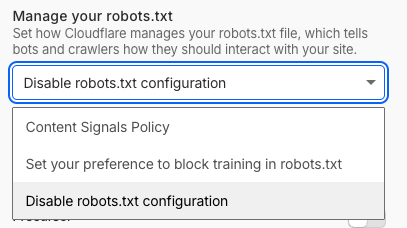
Option 1: Content Signals Policy
- Adds
Content-Signal: search=yes, ai-train=no, use=referenceon the wildcard user-agent - Does NOT add explicit Disallow rules for named training crawlers
- Softer signal: relies on crawlers respecting Cloudflare's Content Signals scheme, which builds on the emerging IETF draft
draft-canel-robots-ai-control - Some crawlers may respect the header, some may not, since the draft is not a settled standard
Option 2: Set your preference to block training in robots.txt
- Prepends the
# BEGIN Cloudflare Managed contentblock to your existing robots.txt, or creates one if you don't have one - Adds the same
Content-Signal: search=yes, ai-train=no, use=referenceheader - Adds explicit
Disallow: /rules for Amazonbot, Applebot-Extended, Bytespider, CCBot, ClaudeBot, Google-Extended, GPTBot, meta-externalagent - Actively blocks the eight named AI training crawlers via robots.txt regardless of whether they honor Content Signals
- Search engines (BingBot, Googlebot, Baidu) remain allowed for search indexing at the file layer
- This is the option that caused my 40-day Bing "Discovered but not crawled" state
Option 3: Disable robots.txt configuration
- Cloudflare stops injecting content into your robots.txt entirely
- Your own file is served exactly as you wrote it
- No Content-Signal header, no injected Disallow blocks
- Every crawler decision stays with you
If your goal is maximum AI-corpus and real-time-grounding surface area, pick Option 3 and ship your own permissive robots.txt. Options 1 and 2 both send some form of "do not train on this content" downstream, either softly (Option 1) or strictly (Option 2).
There is also an adjacent trap worth naming. The Block AI training bots setting on the same Overview page applies a WAF-level block across every categorized AI crawler when set to anything other than "Do not block." Enabling it without per-crawler exceptions eliminates AI search retrieval visibility too, not just training corpus inclusion. If your goal is agentic-commerce presence, keep that setting on "Do not block" and use the per-crawler toggles in the AI Crawl Control Security page for anything more specific.
What to do
- Open your Cloudflare dashboard for the affected domain
- Go to AI Crawl Control → Overview in the sidebar
- Find the Managed robots.txt setting on that page and set it to Disable robots.txt configuration
- Confirm your Block AI training bots setting is on Do not block (allow crawlers) so you aren't blocking crawlers at the edge either
Cloudflare stops injecting content into your robots.txt. Within an hour, the curl test above should show your robots.txt as you wrote it, with no Cloudflare-managed block above it.
If you want to be selective about which specific crawlers to permit or deny at the edge, the per-crawler toggles in the AI Crawl Control grid remain independently configurable. You can Allow at the edge, Block at the edge, and let robots.txt say what you actually want it to say. The two layers are separately controlled. They need to be aligned to work.
After the fix, if you want to accelerate Bing indexing specifically (Bing is slower than Google on lower-authority domains and often gets stuck at "Discovered but not crawled"), set up IndexNow. It is Microsoft's push protocol: a random key file at your domain root, plus a POST call to https://api.indexnow.org/indexnow with the URL list any time content changes. Bing, Yandex, and DuckDuckGo participate. Google does not. Bing crawls submitted URLs within hours instead of days.
What I saw on my own site
Before the fix, measured 2026-08-08:
- Every AI training crawler tested (GPTBot, CCBot, ClaudeBot, Google-Extended, Amazonbot, Applebot-Extended, Bytespider, meta-externalagent) blocked at the robots.txt layer by the Cloudflare-managed block
- AI Crawl Control dashboard concurrently showing every one of those crawlers as "allowed" with green toggles and non-zero request counters
- The request counters were logging crawler activity, but the crawlers were reading robots.txt, seeing Disallow, and leaving without pulling content pages
- BingBot itself technically allowed, but
/researchhad been "Discovered but not crawled" in Bing Webmaster Tools for 40 days
After the fix, measured 2026-08-09, roughly 24 hours later:
- All 13 tested AI crawlers, including grounding and user-initiated variants (OAI-SearchBot, ChatGPT-User, Claude-SearchBot, Claude-User, Perplexity-User), returning clean 200s at the edge with no robots.txt block above them
- AI Crawl Control "Allowed" counter for GPTBot, CCBot, and ClaudeBot moving off zero-content-fetches for the first time (visible in the request patterns, not just the count)
- Bing indexing recovery in flight (Bing's queue moves in days-to-weeks, not hours, and my domain authority is low)
- IndexNow live as a downstream accelerator specifically for Bing
The full downstream effects (training corpus inclusion at the next model refresh, ChatGPT / Claude / Perplexity real-time citations, Bing indexing recovery) take weeks to surface. Model refreshes happen quarterly at best. Grounding index refreshes happen weekly to monthly. Bing crawl queue depth on a small domain is slow no matter what. The plumbing is finally aligned.
Sanity-check any Cloudflare-fronted site right now
If you're on Cloudflare and you care about being cited or retrieved by AI systems, run the check:
curl -sL https://YOURSITE.com/robots.txt | head -20If you see BEGIN Cloudflare Managed content or explicit Disallow: / for GPTBot, you're serving the block. Fix it in the Cloudflare dashboard. Check back in a week to confirm AI Crawl Control shows meaningful Allowed content requests on the crawlers you care about, not just robots.txt fetches.
If you don't see the block, take the win. Then check anyone else's site who wants to be found by agents. This one is worth a five-second grep. Cross-referenced with the Access section on the Readiness pillar, which covers robots.txt vs WAF at the mechanic level: this piece is the specific real-world failure mode.
Frequently Asked Questions
Why does my Cloudflare AI Crawl Control dashboard say GPTBot is allowed while my robots.txt still blocks it?
Cloudflare's AI Crawl Control and its Managed robots.txt feature are two independent controls. The dashboard decides whether to permit a crawler at the network edge, and it can be set to allow. The managed robots.txt setting decides what Cloudflare prepends to your served robots.txt file, and it can be set to Disallow. When the two disagree, a well-behaved crawler reaches the edge, fetches robots.txt, sees Disallow, and leaves. Cloudflare does not surface the conflict in the primary UI, and community bug reports confirm the mismatch.
What is Cloudflare's Content Signals Policy?
Content Signals is Cloudflare's scheme for expressing crawler preferences via robots.txt, building on the emerging IETF draft draft-canel-robots-ai-control. Cloudflare's default policy is Content-Signal: search=yes, ai-train=no, use=reference, meaning search engines are welcome but AI training is not. Depending on the option selected, Cloudflare may also add explicit Disallow rules for eight named AI training crawlers alongside the header.
How do I disable Cloudflare's managed robots.txt?
In your Cloudflare dashboard, open AI Crawl Control and go to the Overview page. Find the Managed robots.txt setting there and set it to Disable robots.txt configuration. Save. Cloudflare will stop injecting content into your robots.txt within an hour. Verify by running curl -sL https://YOURSITE.com/robots.txt | head -20 and confirming the # BEGIN Cloudflare Managed content block is gone.
Does Cloudflare's Content Signals Policy affect my SEO on Google and Bing?
Traditional search crawlers (Googlebot, BingBot) remain allowed for indexing at the file layer, so the direct SEO impact is limited. There is a plausible second-order effect: the Content-Signal header on the wildcard user-agent may influence how search crawlers allocate crawl priority on lower-authority domains. On natepegram.com, a research page sat at "Discovered but not crawled" in Bing Webmaster Tools for 40 days while the block was in place; correlation is not causation, but an injected robots.txt block does not help crawl budget signals.
Which crawlers does Cloudflare's managed robots.txt block by default?
When the "Set your preference to block training in robots.txt" option is selected, Cloudflare adds explicit Disallow rules for eight named AI training crawlers: Amazonbot, Applebot-Extended, Bytespider, CCBot, ClaudeBot, Google-Extended, GPTBot, and meta-externalagent. The Content Signals Policy option adds only the Content-Signal header without explicit Disallow rules. The Disable robots.txt configuration option adds nothing and serves your file as-is.